14 Hand-Drawn Butterfly Seamless Pattern: A Practical Resource for Designers and Makers
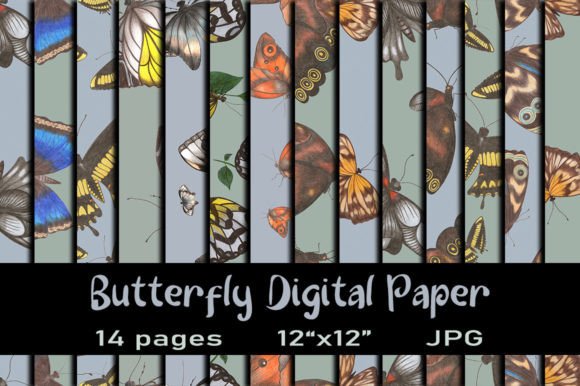
Seamless patterns are foundational assets in visual design—not as standalone elements, but as flexible, repeatable building blocks that support consistency across projects. The 14 Hand-Drawn Butterfly Seamless Pattern collection fits precisely into this role: a set of high-resolution, hand-crafted digital papers designed for real-world application—not just decoration. Each pattern is drawn with colored pencils, scanned at 300 dpi, and carefully tiled to ensure clean, invisible repeats. That means no visible seams when scaled, printed, or layered—critical for professional output.
Where This Collection Fits in Your Creative Workflow
This isn’t a “nice-to-have” add-on. It’s a workflow accelerator. Consider how seamless patterns function across stages:
- Before a project: You’re planning a baby shower invitation suite. Instead of sketching from scratch or sourcing fragmented assets, you select a soft pastel butterfly pattern from the collection and test it against typography, color palettes, and layout grids—all before committing to final design files.
- During execution: You’re designing fabric for a small-batch textile line. The 12 × 12 inch JPEGs scale cleanly to garment panels or quilting blocks. Because they’re 3600 × 3600 px, you retain sharpness even when printing on wide-format printers or exporting for embroidery digitizing software.
- After delivery: A client requests alternate versions—say, a monochrome variant for letterpress or a cropped motif for a custom stamp. You open the original JPEG in Photoshop or Affinity Photo, adjust saturation or contrast non-destructively, and export new variants in under five minutes.
That kind of agility comes from preparation—not luck. These files are built for iteration, not just display.
Compatibility and Real-World Use Cases
The 14 Hand-Drawn Butterfly Seamless Pattern set works where you work—provided your setup supports standard digital asset management. Here’s how it integrates across common tools and platforms:
- Adobe Creative Suite: Drop any JPEG directly into Illustrator (as a linked or embedded image), then use Object > Pattern > Make to convert it into a swatch for vector-based repeats. In Photoshop, use Edit > Define Pattern for quick fills or layer masks.
- Canva Pro: Upload the ZIP file to your Canva account, extract individual JPEGs, and save them to your Brand Kit. Then apply them as backgrounds in invitations, social media banners, or printable planners.
- Procreate or Affinity Designer: Import as layered canvases. Adjust opacity, blend modes, or mask sections to create depth—ideal for greeting card mockups or scrapbook layouts.
- Print-on-demand services (like Spoonflower or Printful): Upload JPEGs directly. Their systems recognize the dimensions and resolution, auto-scaling for fabric, wallpaper, or stationery without manual resizing.
No fonts, templates, or mockups are included—and that’s intentional. This collection assumes you already have a working toolkit. It fills a specific gap: authentic, tactile texture with zero licensing friction. You own full commercial rights to use these patterns in client work, products you sell, or branded materials—no attribution required.
Practical Setup and File Management
These files deliver value only if they’re accessible when needed. Here’s what works—and what doesn’t:
- Best practice: Save the ZIP file to your computer desktop, right-click, and choose “Extract All.” Create a dedicated folder labeled “Butterfly Patterns – Hand-Drawn,” then rename each JPEG meaningfully (e.g., “Butterfly_Pattern_07_SageTeal.jpg”). Consistent naming prevents version confusion later.
- Avoid: Opening the ZIP directly in cloud storage (Google Drive, Dropbox) and trying to edit files there. These platforms don’t reliably preserve DPI or color profiles during preview or download. Always extract locally first.
- iPad/tablet note: You’ll need apps like Files+ or iZip to extract and manage the archive. Previewing is fine—but editing (e.g., adjusting contrast or cropping) requires Procreate or Affinity Mobile, not basic photo viewers.
- Smartphone limitation: Downloading and unzipping on most smartphones isn’t viable. The files are too large for typical mobile OS handling, and JPEG metadata may be stripped during transfer. Stick to laptop or desktop for reliable access.
Color Accuracy and Print Readiness
These patterns were created with physical colored pencils—so their charm lies in subtle grain, slight variation in stroke density, and natural pigment bleed. That authenticity translates well to print—but with one caveat: screen calibration varies. What looks warm on your monitor may appear cooler on coated paper stock.
To manage expectations:
- Always soft-proof in Photoshop using your printer’s ICC profile before final output.
- For critical color matching (e.g., brand-aligned baby shower invites), order a physical test print first—even a single 5 × 7 inch sample reveals how cyan tones or ochre undertones render on your chosen paper.
- Don’t rely on RGB previews alone. Convert to CMYK early in your workflow if preparing for offset printing.
Long-Term Integration Into Your Asset Library
Treat this collection like infrastructure—not inventory. That means organizing it for reuse over months or years:
- Add keywords in your DAM (Digital Asset Management) tool: “hand-drawn,” “butterfly,” “seamless,” “colored-pencil,” “300dpi,” “scrapbooking,” “textile.”
- Create a master spreadsheet listing each pattern’s dominant colors, mood (e.g., “whimsical,” “vintage,” “botanical”), and ideal use cases (e.g., “best for greeting cards,” “works well with serif typography”).
- Archive a backup copy offline—on an external SSD or encrypted cloud folder—so you’re never dependent on a single download link.
Over time, you’ll notice which patterns get reused most often. That’s useful data: it tells you what resonates with your audience, clients, or personal style—and informs future purchases or commissions.
Workflow Examples Across Roles
Freelance graphic designer: You’re building a branding package for a nature-themed wellness studio. You use Pattern #3 (soft lavender + charcoal butterflies) as background texture behind service icons in a presentation deck—and the same pattern as a subtle watermark on downloadable PDF guides.
Small business owner (stationery shop): You load all 14 patterns into your Printful dashboard, pair them with minimalist foil-stamped text, and launch a seasonal “Spring Collection” of greeting cards—no new design hours required.
Scrapbooker or educator: You print Pattern #9 onto cardstock, cut it into 2-inch squares, and use them as tactile sorting tiles in a classroom activity about symmetry and repetition in nature.
In each case, the value isn’t in the butterflies themselves—it’s in the speed, fidelity, and flexibility they bring to decisions already underway.
Final Implementation Tip: Start Small, Scale Intentionally
Don’t try to use all 14 patterns at once. Pick three that align with your current project’s palette and purpose. Test one at actual print size. Adjust brightness or contrast if needed. Then build outward—adding layers, overlays, or typography only after the base pattern feels resolved.
That approach keeps focus on outcome, not ornamentation. And it turns the 14 Hand-Drawn Butterfly Seamless Pattern collection from a decorative download into a functional part of your creative infrastructure—reliable, repeatable, and quietly essential.