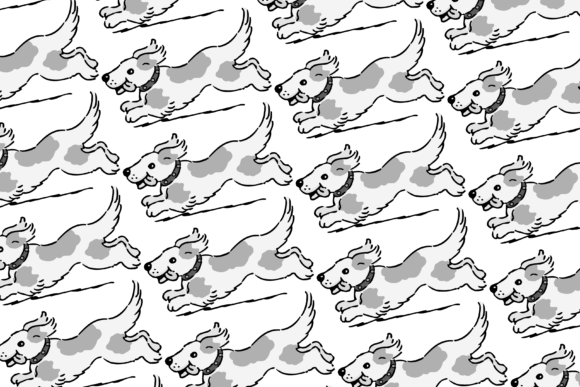
Dog Pattern: A Practical Asset for Creative and Commercial Projects
When you’re building a product line, launching a brand, or developing content for print or digital use, consistent, high-quality visual assets are non-negotiable. The Dog Pattern is one such asset — not a trend or gimmick, but a functional, production-ready design element built for real-world implementation. It’s not just “cute” or “thematic”; it’s engineered for versatility across media, resolution, and workflow stages.
What the Dog Pattern Is — And What It’s Designed to Do
The Dog Pattern is a seamless, repeatable surface design featuring stylized canine motifs arranged with balanced spacing, rhythm, and visual weight. Unlike single-illustration graphics, it’s constructed as a tiling pattern — meaning it repeats infinitely without visible seams or breaks. This makes it fundamentally different from standalone clipart or isolated icons. Its purpose is structural: to serve as a foundational layer in layouts, backgrounds, and physical products where repetition adds cohesion and texture.
You’ll receive each Dog Pattern in two high-fidelity formats: PNG (5000px × 5000px, transparent background) and JPG (5000px × 5000px, white background). Both are rendered at 300 dpi — the industry standard for professional print output. This isn’t a scaled-down web graphic repurposed for print; it’s built from the ground up for fidelity, clarity, and scalability.
Where the Dog Pattern Fits Into Your Workflow
Integration begins before your first design session — not after. Because it’s delivered as a ready-to-use digital file, the Dog Pattern functions as a pre-vetted component in your asset library. Think of it like stocking your pantry with quality flour or spices: you don’t wait until the recipe calls for it to source the ingredient. You acquire it ahead of time, test it, organize it, and keep it accessible.
For example:
- Before starting a low-content book project, import the PNG into your layout software (like Adobe InDesign or Affinity Publisher), set it as a background swatch, and apply it to interior pages or covers. Its 5000px dimension ensures sharpness even when scaled across large spreads or trimmed margins.
- While designing fabric for an apparel or home goods line, drop the pattern into textile design tools (e.g., Spoonflower’s editor or Illustrator’s Pattern Maker). Its seamless nature eliminates manual tiling work — saving hours per design iteration.
- After finalizing a branding package, use the JPG version to generate branded wrapping paper mockups for client presentations. Its white background means no extra masking or layer cleanup before export.
Compatibility Across Tools and Platforms
The Dog Pattern works where you already work — no plugin required, no conversion needed. Its PNG and JPG formats are universally supported by design, publishing, and e-commerce platforms. Whether you’re using Canva for quick social templates, Cricut Design Space for craft projects, or Printful for on-demand mugs and notebooks, these files integrate without friction.
Key compatibility considerations:
- Transparency matters: Use the PNG when layering over photos, gradients, or colored backgrounds — especially for digital mockups or web banners.
- Print-ready simplicity: Choose the JPG when submitting to POD (print-on-demand) services that require RGB or CMYK JPEGs with solid backgrounds — no risk of transparency errors during RIP processing.
- Resolution confidence: At 5000px × 5000px and 300 dpi, the pattern supports outputs up to ~16.7 inches square at full resolution — enough for large-format wall art, fabric bolts, or multi-page book interiors without upscaling artifacts.
Practical Implementation Tips for Consistent Results
Getting predictable outcomes starts with intentional file handling. Here’s how experienced creators structure their use of the Dog Pattern:
Organize by Use Case, Not Just File Type
Create dedicated folders labeled “Mug Backgrounds”, “Fabric Swatches”, or “Low-Content Book Interiors”. Within each, store both PNG and JPG versions alongside a README.txt noting recommended scale ranges (e.g., “Use at 75–100% scale for 11×8.5” notebook interiors”). This reduces decision fatigue mid-project.
Test Before Scaling
Before applying the pattern to a full run of 100 mugs or 500 book copies, run a small test: print a single 4×6 inch swatch on your target paper stock or order one sample mug. Patterns can behave differently depending on ink absorption, fabric weave, or ceramic glaze — subtle shifts in contrast or spacing become visible only in physical form.
Adjust Tiling Behavior Strategically
In vector-based tools like Illustrator, convert the raster pattern to a swatch and adjust tile spacing manually if needed. In Photoshop, use “Edit > Define Pattern” and experiment with offset values to shift emphasis — e.g., increasing horizontal offset slightly can create a sense of motion ideal for pet-themed fitness journals.
Long-Term Usability and Quality Control
A digital asset’s lifespan depends less on novelty and more on reliability across updates, teams, and platforms. The Dog Pattern supports long-term use because it avoids trends that date quickly — no hyper-specific breed caricatures, no seasonal props (like holiday collars), and no text overlays. It’s stylistically neutral enough to pair with serif or sans-serif typography, minimalist or maximalist layouts, and warm or cool color palettes.
To maintain consistency over time:
- Store original files in cloud backup with versioned naming (e.g., “dog-pattern-v2-png-5000x5000-300dpi.png”).
- Document color profiles used (sRGB for web/digital, CMYK for commercial print) so future collaborators know which variant to pull.
- Archive usage examples — a folder of past projects showing the pattern applied to mugs, fabric tags, and book spines — serves as both reference and portfolio evidence.
Real-World Integration Examples
Consider how educators use the Dog Pattern in classroom materials: a science teacher prints it onto laminated behavior charts, reinforcing thematic continuity across units about animal biology. A freelance illustrator layers it beneath hand-drawn dog anatomy sketches to create textured, cohesive workbook pages. A small-batch candle maker applies it to custom jar labels — then reuses the same file for Instagram story templates, ensuring visual alignment across physical and digital touchpoints.
None of these uses require redesigning the core asset. They rely instead on thoughtful placement, scale, and context — exactly what a well-built pattern enables.
Final Considerations for Smooth Adoption
Because this is a digital-only product, there’s no shipping delay, no inventory tracking, and no physical storage. But that also means responsibility for organization falls entirely to you. Set aside 10 minutes after download to: rename files clearly, add them to your asset management system (even if it’s a simple spreadsheet), and open one in your primary design tool to verify import behavior.
Also remember: the Dog Pattern is most effective when treated as infrastructure — not decoration. It supports decisions, doesn’t replace them. You still choose typography, hierarchy, messaging, and user flow. The pattern simply ensures the visual foundation remains professional, cohesive, and technically sound across every application.
If your current process involves stitching together free graphics, resizing mismatched assets, or troubleshooting blurry backgrounds on printed goods, integrating the Dog Pattern isn’t an extra step — it’s a compression of effort. One file, multiple validated uses, zero compromise on resolution or intent.