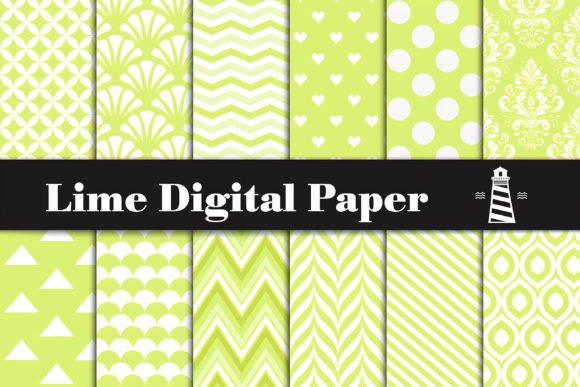
Lime Digital Paper: 12 Vibrant 12×12 Backgrounds
When color meets clarity—and utility meets inspiration—you get Lime Digital Paper. It’s not just another digital background pack. It’s a thoughtfully curated set of 12 high-resolution files (300 dpi, 12×12 inches, JPG) built around the energetic, fresh, and versatile tone of lime. No gradients, no noise—just clean, repeatable patterns with consistent saturation and crisp detail. Designed for real work, not just aesthetics.
Why Lime? Why Now?
Lime sits at a strategic point in the color spectrum: it’s brighter than green but more grounded than neon yellow. That makes it unusually flexible. It reads as joyful without being childish, modern without feeling cold, and bold without overwhelming. For creators who need to balance personality with professionalism—whether designing a boutique’s holiday label or a teacher’s classroom newsletter—lime delivers visual impact while keeping messaging clear and accessible.
These backgrounds aren’t random repeats. Each pattern has intentional rhythm: some use subtle geometric tessellations, others feature organic leaf motifs or minimalist line textures—all scaled to hold up at print size and screen resolution. Because they’re delivered at 300 dpi and full 12×12 inch dimensions, you can confidently crop, layer, or tile without pixelation or loss of fidelity.
Real Projects, Real Platforms
Here’s where Lime Digital Paper earns its place in your toolkit—not as decoration, but as infrastructure for communication.
- Print-first creators: Use one background as the base for a birthday invitation suite—then reuse a variation for matching gift tags, cupcake toppers, and photo booth props. The consistent color palette ties everything together, even when elements are printed on different materials (cardstock, kraft paper, sticker sheets).
- Digital marketers: Layer text over a low-contrast lime pattern for social media banners or email headers. Its brightness lifts copy without competing—especially effective for calls-to-action or limited-time offers.
- Educators & presenters: Build slide decks where each section starts with a different lime background. Subtle enough to keep focus on content, distinct enough to signal transitions. Bonus: students respond well to this hue—it’s associated with alertness and positivity in cognitive studies.
- Bloggers & small business owners: Swap desktop wallpapers weekly using these files—no need for new design work. Or embed one as a section divider on your website’s “About” or “Services” page to add texture without slowing load time (JPGs stay lean).
Adapting for Your Audience and Format
The strength of Lime Digital Paper lies in how easily it adapts—not just visually, but functionally. A freelance graphic designer pitching to a wellness brand might use the leaf-patterned background behind a clean serif headline; the same file, inverted and desaturated by 20%, becomes an elegant backdrop for a meditation app’s onboarding screen.
For educators preparing printable resources: pair a busy lime pattern with generous white space and thick sans-serif type. That contrast ensures readability for young readers or neurodiverse learners. For packaging designers: test one background printed on matte vs. glossy stock—the lime stays vibrant either way, but the finish changes the mood entirely.
Small business owners launching a product line can use all 12 files across touchpoints—without repeating the same image twice. One for the Shopify banner, another for Instagram Story highlights, a third as the header in a PDF lookbook. Consistency emerges from shared color and quality—not repetition.
Keeping It Clear, Consistent, and Original
High-resolution files give you room to experiment—but clarity still depends on restraint. Here’s what works:
- Limit overlays: Add text or icons only where contrast is strong. If a pattern feels too active, drop opacity to 85–90% or apply a soft white overlay at 5–10% opacity before adding type.
- Anchor with typography: Pair lime backgrounds with fonts that have open letterforms and generous x-heights (like Inter, Lato, or Montserrat). Avoid thin weights or overly decorative scripts—they’ll fight for attention.
- Stay organized: Name files meaningfully—e.g., lime-geometric-03.jpg, lime-leaf-subtle.jpg. This saves time when building multi-page documents or batch-editing for social.
- Respect context: A vibrant lime background may energize a kids’ party invite—but could feel jarring on a legal services brochure. Ask: *Does this support the message—or distract from it?*
Ideas That Go Beyond the Obvious
Don’t stop at invites and labels. Try these less-common applications:
- Virtual meeting backdrops: Resize any file to 1920×1080 and use it in Zoom or Teams. Lime’s even tone avoids motion blur and looks sharp on camera—even with basic webcams.
- Custom notebook covers: Print one background onto printable sticker paper, then apply it to blank notebooks. The 12×12 size fits standard A5 or 6×9 inch journals with room to trim.
- SVG layering: Import a lime background into Figma or Illustrator, then trace simple shapes over it to create custom clipart sets—ideal for educators building themed lesson materials.
- Embroidery guides: Print a background at actual size, then trace motifs onto fabric as a stitching reference. The high DPI ensures fine details remain legible.
A Resource, Not a Shortcut
Lime Digital Paper doesn’t replace design thinking—it supports it. You still choose font pairings, decide hierarchy, and edit copy for impact. What it does eliminate is the time spent hunting for a reliable, on-brand background that prints cleanly and scales well. That reclaimed time adds up: 15 minutes saved per project × 20 projects = 5 hours redirected toward strategy, storytelling, or client feedback.
It also removes guesswork. No more testing whether a free download will hold up at 12×12 inches. No more adjusting saturation after noticing color shifts between screen and printer. These files were built for execution—not just inspiration.
If you’re building something tangible—a card, a campaign, a classroom resource, or a brand identity—Lime Digital Paper gives you a dependable starting point. Not a template to fill, but a foundation to build on. And sometimes, the most creative choice isn’t adding more—it’s choosing wisely, once, and using it well across everything that follows.