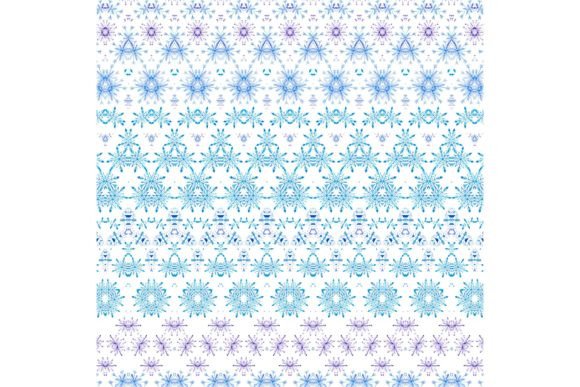
Snowflakes 202: Elegant Turquoise and Violet Snowflakes on Crisp White Background
Whether you're designing a handcrafted holiday card, preparing a seasonal blog banner, or developing a limited-edition fashion line with winter motifs, Snowflakes 202 delivers immediate creative value. This high-resolution digital background features delicately rendered snowflakes in soothing turquoise and vibrant violet tones, set against a clean white backdrop — a versatile, print-ready asset designed for real-world use across physical and digital projects.
Many creators face recurring challenges when sourcing winter-themed design elements: generic patterns that lack sophistication, low-resolution files unsuitable for print, color palettes that clash with brand guidelines, or licensing restrictions that limit commercial application. Others struggle to find cohesive, scalable assets that work equally well on a 5×7 greeting card and a 36-inch event poster. Snowflakes 202 was created to resolve those pain points — not as a decorative afterthought, but as a purpose-built resource grounded in practicality and creative flexibility.
What Makes Snowflakes 202 Stand Out?
Snowflakes 202 is more than just a pretty pattern. It’s a professionally crafted, 12×12 inch (30.5×30.5 cm) JPG file at true 300 dpi resolution — meaning it prints crisply at full size without pixelation or softening. Unlike tiled web graphics or stretched social media templates, this file maintains fidelity whether used for letterpress stationery, fabric printing, or large-format wall art. The deliberate choice of turquoise and violet adds contemporary contrast to traditional winter themes — evoking frosty clarity and quiet elegance without leaning into cliché red-and-green tropes.
The snowflake motif itself balances intricacy and readability: each shape is distinct yet harmonious, avoiding visual clutter while offering enough detail to hold interest up close. Because the background is pure white (not transparent), it integrates seamlessly into most design workflows — no need for masking, layer adjustments, or background removal. Designers using Adobe Photoshop, Affinity Designer, Canva, or even Microsoft Word can drop it in and begin customizing immediately.
Real-World Applications You Can Start Today
Here’s how different users are already applying Snowflakes 202 to solve specific needs:
- Stationery designers use it as a base for foil-stamped holiday cards — the white space allows room for elegant typography and metallic accents, while the turquoise/violet palette pairs beautifully with silver, charcoal gray, or matte gold.
- Small-batch crafters print it onto heavyweight cardstock for handmade gift tags, scrapbook pages, or layered paper ornaments — the 300 dpi ensures clean edges when die-cutting or hand-trimming.
- Self-publishing authors adapt it as a subtle background for book covers (especially cozy mysteries, romance novels, or children’s stories with winter settings), adjusting opacity to let title text remain fully legible.
- Fashion and textile designers scale and repeat the pattern for scarves, pillow covers, or limited-run apparel — the balanced spacing between snowflakes prevents overcrowding, even when enlarged for fabric repeats.
- Digital content creators apply it as a blog header, YouTube thumbnail background, or email newsletter banner — its high contrast and clear focal area help guide viewer attention without competing with overlays or call-to-action buttons.
Smart Implementation Tips for Best Results
To get the most from Snowflakes 202, consider these practical recommendations:
- For printing: Always export final layouts at 300 dpi and confirm your printer accepts RGB JPG files (most modern commercial and home printers do). If ordering professional offset printing, ask your vendor whether they prefer CMYK — many will convert automatically, but a pre-converted version may offer tighter color control.
- For digital use: When placing over photos or textured layers, try blending modes like “Multiply” or “Overlay” to integrate the snowflakes organically. Reduce opacity slightly (to 85–90%) if you want the pattern to recede and support other visual elements.
- For scalability: While the native 12×12 inch size works perfectly for standard scrapbook pages or card bases, avoid stretching beyond 200% in raster editors. For larger applications (e.g., posters or murals), pair Snowflakes 202 with complementary solid-color borders or gradient overlays rather than extreme scaling.
- For accessibility: When using on websites or digital documents, ensure sufficient contrast between overlay text and the snowflake areas — especially where violet sits near white. A quick contrast checker (like WebAIM’s tool) helps verify readability for all users.
Who Benefits Most — and How They Use It Differently
A wedding invitation designer might use Snowflakes 202 as a delicate border element, cropping and mirroring sections to frame names and dates with seasonal grace. In contrast, an indie game developer could tile a modified version across a UI menu background, adjusting hue saturation to match their game’s winter biome palette. A teacher creating printable classroom resources may import it into Google Slides, then lock the background layer while adding interactive elements — leveraging its visual calm to support focus during December lessons.
What unites these diverse users isn’t just aesthetic preference — it’s the shared need for reliability. With Snowflakes 202, there’s no guesswork about resolution limits, licensing ambiguity, or color consistency across devices. That reliability translates directly into time saved, fewer revision rounds, and greater confidence in final output — whether you’re producing one-of-a-kind art prints or fulfilling a batch order of 500 greeting cards.
Final Thought: Design With Purpose, Not Just Decoration
Holiday design shouldn’t mean choosing between beauty and function — or between inspiration and execution. Snowflakes 202 bridges that gap. Its thoughtful color balance, production-grade resolution, and intentional negative space make it a working tool, not just a visual flourish. Whether you're refreshing your brand’s seasonal identity, launching a craft-based side business, or simply bringing more intention to your personal holiday projects, this background supports your goals — quietly, consistently, and beautifully.
When every creative decision counts, having a dependable, ready-to-use resource like Snowflakes 202 means you spend less time troubleshooting files and more time expressing what matters most: warmth, connection, and the quiet magic of the season.