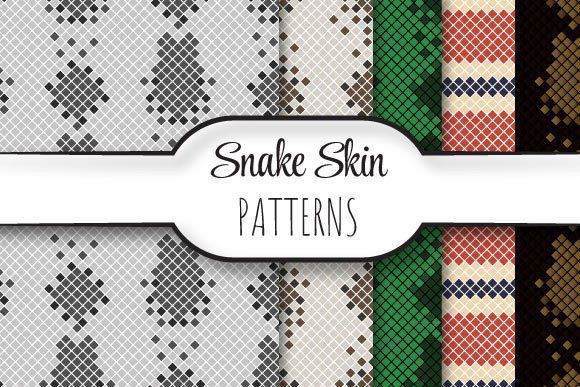
Snake Skins: Seamless Vector Patterns for Real-World Design
If you've ever spent hours tiling a texture only to spot misaligned edges or visible seams—especially at print scale—you know how frustrating imperfect repeats can be. Snake Skins solves that. It’s not just another pattern pack—it’s a precision-engineered, seamlessly repeating vector pattern built for professionals who need flawless scalability, crisp output, and immediate usability across media.
What Makes Snake Skins Different From Generic Repeating Patterns?
Most “seamless” patterns are raster-based or loosely constructed in older vector formats. Snake Skins is built as a true vector repeat: mathematically aligned, edge-to-edge consistent, and fully editable in Adobe Illustrator (and compatible apps) without distortion or loss of fidelity. Each file is sized to 12 × 12 inches at 3600 × 3600 pixels—300 dpi native resolution—so whether you’re printing a wall mural or scaling down to a business card, the geometry holds. The EPS 10 format ensures backward compatibility with legacy workflows while preserving layers, transparency, and clipping paths.
The ZIP package includes one production-ready EPS file plus five high-fidelity JPEGs—each matching the same dimensions and resolution. That means you can drop the EPS into layouts for editing or use the JPEGs directly in CMS platforms, email templates, or social ads where vector support isn’t available. No conversion headaches. No pixelation surprises.
Why Seamless Repeats Matter More Than You Think
A seamless pattern isn’t just about aesthetics—it’s functional infrastructure. In branding, a repeating motif on packaging, stationery, or retail signage must align perfectly across folds, seams, and panels. A visible break in the repeat undermines professionalism and dilutes visual cohesion. In digital interfaces, seamless textures add depth to UI elements like buttons, cards, or background overlays—without increasing load time (since one small vector tile renders infinitely).
Snake Skins delivers this reliability out of the box. Its construction eliminates the need for manual offsetting, blending mode tweaks, or trial-and-error tiling. You place it once, scale it to fit your artboard, and it repeats cleanly—horizontally, vertically, or both. That saves 15–30 minutes per project for designers handling multiple assets, and eliminates costly reprints due to alignment errors.
Real Applications Across Roles
- Freelance designers use Snake Skins to rapidly build branded presentation decks—applying the pattern as a subtle slide background that reinforces identity without competing with content.
- Educators and trainers integrate it into printable worksheets or workshop handouts where tactile texture improves visual hierarchy and retention—especially in STEM or design curricula.
- Small business owners apply it to product labels, thank-you cards, or Instagram story templates, creating a cohesive look across touchpoints without hiring a designer for every variation.
- Bloggers and content creators embed the JPEG versions into Canva or WordPress headers, using the organic rhythm of the pattern to guide attention toward headlines or CTAs.
- Marketing teams deploy it in trade show backdrops and booth flooring graphics—where large-format printing demands absolute repeat integrity to avoid distracting “jumps” at seam lines.
Design Integrity Without Compromise
Unlike many pattern libraries that prioritize visual novelty over technical rigor, Snake Skins balances form and function. The vector paths are optimized—not bloated with unnecessary anchor points—so files stay lightweight and responsive in complex documents. Colors are defined in CMYK and RGB-safe palettes, reducing color-shift risk between screen and press. And because it’s built in EPS 10, it opens reliably in Illustrator CS6 through CC 2024, Affinity Designer, CorelDRAW, and even newer web-based editors with EPS import capability.
You’re not locked into one style either. While “snake skin” evokes organic texture, this isn’t literal reptile imagery—it’s an abstracted, geometric interpretation: interlocking scales rendered with precise negative space, subtle tonal shifts, and balanced density. That makes it versatile enough for tech brands seeking sophistication, wellness studios wanting grounded elegance, or fashion labels aiming for quiet luxury.
Practical Tips Before You Use It
- Test the repeat first. Place the EPS on a large artboard (e.g., 24 × 24 inches), enable “Pattern Options,” and preview how it tiles before committing to final layout. Illustrator’s “Transform Each” or “Object > Pattern > Make” aren’t needed—the file is pre-configured for immediate repeat use.
- Adjust color thoughtfully. Since the pattern relies on contrast and rhythm, avoid oversaturating or flattening light/dark relationships. Try global recoloring (Edit > Edit Colors > Recolor Artwork) rather than selecting individual paths.
- For web use, optimize JPEGs selectively. The included JPEGs are print-ready—but for websites or emails, resave them at 72–120 dpi with moderate compression. They’ll retain clarity as CSS background images or inline elements.
- Check licensing scope. This asset is cleared for commercial use—including client work—but verify redistribution terms if bundling into templates you sell or license.
When “Good Enough” Isn’t Enough—And What to Do Instead
We’ve all used free patterns that looked fine at thumbnail size—then revealed jagged edges, inconsistent spacing, or muddy gradients when zoomed or printed. Those compromises accumulate: slower revisions, tighter deadlines, last-minute fixes. Snake Skins removes that uncertainty. It’s tested across real-world outputs—from letterpress business cards to 10-foot banner stands—and built to perform consistently, not just look impressive in a preview window.
That reliability translates directly to confidence—for you, your clients, and your audience. When someone sees a finely tuned pattern on your packaging or presentation, they don’t think “nice texture.” They subconsciously register care, consistency, and competence. That’s brand equity you don’t have to explain—it’s embedded in the craft.
Final Thought: Tools Should Disappear Into Your Workflow
The best design resources don’t draw attention to themselves. They disappear into your process—enabling speed, accuracy, and intentionality without friction. Snake Skins does exactly that. It’s not a trend-driven flourish. It’s infrastructure. A quietly capable tool that handles the repetition so you can focus on the message, the strategy, and the human impact behind every pixel and ink dot.