Check Pattern: A Practical Asset for Design, Production, and Brand Execution
Check Pattern isn’t just a visual motif—it’s a functional design element with measurable utility across physical and digital workflows. Whether you’re screen-printing a limited-run t-shirt collection, developing eco-friendly packaging for an e-commerce brand, or designing repeatable fabric motifs for a fashion line, Check Pattern serves as both foundation and finish. Its structured rhythm supports consistency in scale, alignment, and color reproduction—critical factors when moving from concept to tangible output.
Where Check Pattern Fits in Your Creative or Business Workflow
Unlike decorative assets added at the final stage, Check Pattern integrates early and remains relevant throughout execution. In pre-production, it helps establish visual tone and technical boundaries: Does the check scale cleanly across a 12-inch garment panel? Will it tile seamlessly on a 24″ × 36″ corrugated box? During production, it acts as a reference for color calibration, resolution verification, and bleed management—especially when printed across varied substrates like cotton jersey, kraft paper, or polyester satin. Post-production, it contributes to brand recognition: consistent check spacing and contrast reinforce visual memory across touchpoints—from product tags to social media banners.
This dual role—as both planning tool and production asset—means Check Pattern supports decision-making before a single file is sent to print. For example, selecting a check size too small for fabric weave may cause moiré; choosing one too large for a gift wrap roll can waste material or disrupt wrapping efficiency. The right pattern bridges intention and outcome without requiring custom illustration each time.
The Check Pattern Digital Paper Bundle: Designed for Real-World Use
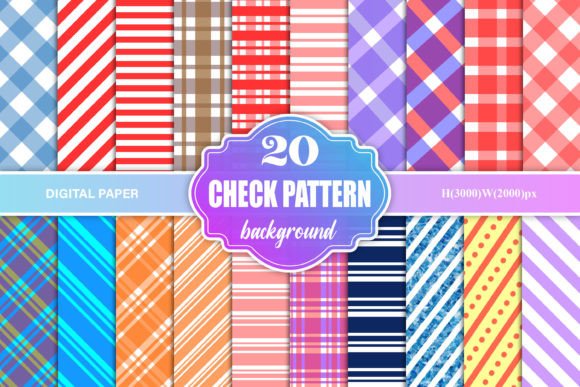
The Check Pattern Digital Paper Bundle delivers 50 high-resolution JPG files built for immediate integration—not just inspiration. Each file measures 3000×2000 pixels, optimized for flexibility across applications: large-format printing, web display, mockup overlays, and digital presentation. At 300 DPI and RGB color space, they meet industry standards for commercial printing while remaining compatible with common design software (Adobe Photoshop, Illustrator, Affinity Designer, Canva Pro) and desktop printers.
These aren’t generic repeats pulled from free asset libraries. They’re engineered for predictability: consistent spacing, neutral background contrast, and clean anti-aliasing that avoids pixelation when scaled down for labels or enlarged for wall graphics. That reliability saves time during proofing—no need to re-rasterize or adjust dithering—and reduces back-and-forth with print vendors over color fidelity or tiling artifacts.
Apparel & Textile Production
When printing on shirts or fabric, use Check Pattern files as underlays in your layout software to test how the motif interacts with seam allowances, pocket placement, and garment grain. Import a file at actual print size, then overlay your logo or typography to verify legibility and balance. Because all 50 patterns share identical dimensions and resolution, swapping one for another during client review takes seconds—not hours.
Packaging & Label Design
For packaging, consistency matters across SKUs. Assign specific check densities (e.g., tight 10-pixel checks for premium skincare boxes, wider 40-pixel variants for artisanal food wraps) to signal quality tiers without changing fonts or layouts. Use the bundle’s uniform file specs to build reusable templates in Illustrator or Figma—then drop in different patterns based on material thickness or finishing method (matte lamination vs. spot UV).
Digital Mockups & Presentations
Bundle files work directly in smart object layers. Drag a Check Pattern JPG into a layered PSD mockup of a tote bag or notebook cover—the pattern automatically conforms to perspective and lighting. This eliminates guesswork when presenting to stakeholders who need to visualize texture, scale, and contrast before approving production runs.
Compatibility, Organization, and Long-Term Usability
All 50 files are named descriptively (e.g., check_12px_dkgray_rgb.jpg, check_32px_charcoal_rgb.jpg)—not numerically—so you can filter by density, tone, or contrast without opening each file. This naming convention aligns with standard DAM (Digital Asset Management) practices, making them easy to integrate into shared cloud folders, Notion databases, or Adobe Bridge catalogs.
RGB color mode ensures accurate on-screen previews and compatibility with most online print services—no conversion delays or unexpected shifts when uploading to platforms like Printful, Gelato, or local print shops using RGB workflows. If CMYK output is required later, convert only the files you’ll actually use, preserving the original RGB versions for future digital or wide-gamut projects.
Because these are static JPGs—not vector-based or procedural textures—they load quickly, render reliably across devices, and avoid plugin dependencies. You don’t need special software licenses or rendering engines to deploy them. That simplicity supports long-term usability: a pattern selected today will open and print identically five years from now, even as software versions change.
Workflow Tips for Smoother Implementation
- Start with scale testing: Before committing to a pattern, place it at 100% scale on a mockup of your final substrate. Zoom to 200% to inspect edge sharpness and repeat seamlessness.
- Batch-check color values: Use your design app’s eyedropper tool to confirm background and line colors match your brand palette. Minor variations between files are intentional—designed for tonal range—not inconsistencies.
- Pre-size for common outputs: Save copies resized to standard print dimensions (e.g., 8.5″ × 11″ for wrapping paper tests, 12″ × 16″ for apparel panels) so you’re not resizing mid-project.
- Use as a quality control layer: Overlay a Check Pattern file on your final print-ready PDF at 10–20% opacity. Any distortion, blurring, or misalignment becomes instantly visible—helping catch RIP (Raster Image Processor) errors before plates are burned.
- Document usage decisions: Note which pattern number was used for which SKU or campaign. This builds internal knowledge and avoids redundant selection effort on repeat projects.
Thinking Beyond the Pattern
Check Pattern gains value not in isolation—but in context. It works alongside Pantone guides for color matching, grid systems for layout precision, and print specifications sheets for substrate-specific guidance. When paired with a well-documented brand style guide, it reinforces structure without constraining creativity. And because it’s resolution- and format-stable, it scales with your operation: from a solo designer running Etsy listings to a marketing team coordinating seasonal launches across three continents.
Its strength lies in repeatability without rigidity—offering enough variation (50 distinct options) to support nuanced expression, yet enough uniformity (shared dimensions, DPI, color space) to maintain operational clarity. That balance makes it less of a “design element” and more of a workflow anchor: something you reach for not because it looks good, but because it solves a problem efficiently, consistently, and without overhead.
If your process involves translating ideas into physical or digital deliverables—where timing, accuracy, and cross-platform fidelity matter—Check Pattern isn’t an extra step. It’s part of the infrastructure that keeps execution aligned with intent.