Fire Seamless Patterns Set
Fire isn’t just a force of nature—it’s a visual language. Bold, dynamic, and instantly evocative, fire conveys energy, transformation, urgency, and passion. When translated into seamless patterns, it becomes a versatile design asset: scalable, repeatable, and ready to elevate projects across digital and print media. The Fire seamless patterns set delivers this power in a practical, high-fidelity package—designed for real work, not just inspiration.
What You Get—and Why It Matters
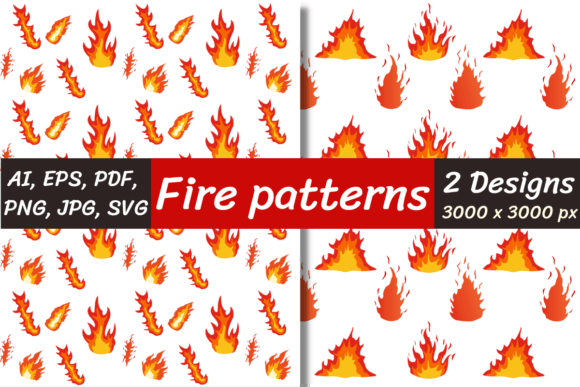
This set includes two distinct, hand-crafted fire-themed digital papers—each 3000 × 3000 pixels, RGB, 300 DPI, and optimized for clarity at any scale. They’re not stock photos or AI-generated abstractions. These are intentional, balanced compositions built for repetition: no visible seams, no awkward breaks, no pixelated edges when tiled.
Every pattern ships in seven widely compatible formats: AI (editable vectors in Adobe Illustrator), EPS (cross-software vector support), PNG (high-res raster with full transparency support), PNG transparent (same as PNG but pre-optimized for layering over any background), JPG (lightweight, web-ready), PDF (print-safe, multi-page preview + vector embedding), and SVG (responsive, code-friendly, ideal for web UIs and interactive projects).
All files arrive in a single ZIP archive. You’ll need unzipping software—like WinZip or WinRAR—installed on your computer or laptop to access them. Once extracted, you’re ready to use immediately, whether you're designing a social media banner in Canva, building a Shopify product page in Figma, or preparing a presentation deck in PowerPoint.
Creative Applications That Actually Work
Seamless fire patterns thrive where impact meets utility. Here’s how different users apply them—with purpose:
- Designers & Freelancers: Use the SVG or AI files to create animated backgrounds in After Effects or Lottie; overlay the PNG transparent version on hero sections for depth without obscuring text legibility.
- Marketers & Small Business Owners: Apply the JPG or PDF versions to email headers, sales landing pages, or limited-edition packaging—especially for brands tied to innovation, fitness, or bold lifestyle positioning.
- Educators & Presenters: Import the EPS or PDF into Keynote or Google Slides to build visually cohesive slide decks for science units on combustion, energy transfer, or even metaphorical discussions about motivation and change.
- Bloggers & Content Creators: Drop the PNG transparent file behind quote graphics or podcast episode thumbnails—fire adds intensity without competing with typography or faces.
- Hobbyists & Makers: Print the high-res JPG or PDF on fabric or vinyl for custom apparel, stickers, or wall decals. Because each pattern is 3000 × 3000 px, it scales cleanly from business card size to poster format.
How to Use Fire Without Overpowering
Fire commands attention—so intentionality matters. Avoid treating it as mere decoration. Instead, ask: What emotion or message does this support? A fiery background behind a “limited-time offer” button reinforces urgency. Used subtly as a border element in an SVG icon set, it signals heat-related functionality (e.g., cooking apps, HVAC services, wellness trackers).
Keep contrast and readability central. If placing text over the pattern, use the PNG transparent version and add a subtle semi-opaque overlay (10–20% black or white) beneath your copy. In Illustrator or Photoshop, try blending modes like Multiply or Overlay to integrate fire texture with brand colors—rather than fighting them.
For consistency across platforms, stick to one primary format per use case: SVG for websites, PDF for print collaterals, PNG transparent for social graphics. That way, your output stays sharp, fast-loading, and predictable—no last-minute scaling surprises.
Why Format Choice Changes Real Outcomes
Not all file types behave the same—and misusing them leads to blurry banners, broken vectors, or missing transparency.
- AI & EPS: Best when you need to recolor, resize infinitely, or edit individual flame elements. Ideal for logo variations or branded merchandise mockups.
- SVG: Use for responsive websites, interactive dashboards, or icons that must adapt to dark/light mode. It loads faster than raster alternatives and remains crisp on Retina displays.
- PNG transparent: Your go-to for layered designs—think Instagram story templates, Canva presentations, or Figma UI kits where clean cutouts matter.
- JPG: Choose this for email campaigns, blog headers, or ads where file size affects load speed—but avoid using it for text-heavy overlays unless you’ve added contrast protection.
- PDF: Print-ready by default. Embed fonts, preserve layers, and share with clients or printers who don’t use design software.
Realistic Tips for Getting Started
You don’t need advanced skills to benefit from these patterns. Start small:
- Open the PNG transparent file in your preferred editor (even free tools like Photopea or Google Slides work).
- Place it behind a headline or call-to-action box—then adjust opacity to 30–50% until it supports, not distracts.
- Try the SVG in a web project: paste the code directly into HTML, then control size and color via CSS.
- For print, open the PDF in Acrobat or Illustrator—zoom to 400% to confirm edge fidelity before sending to press.
If you’re building a brand system, pair one fire pattern with a neutral secondary texture (like concrete, linen, or brushed metal). That contrast creates hierarchy—and keeps fire feeling intentional, not chaotic.
Designed for People Who Make Things
This Fire seamless patterns set was built for doing—not just browsing. It respects your time, your tools, and your standards. No watermarks. No upsells. No vague promises. Just two high-resolution, production-ready patterns—in formats that align with how you actually work.
Whether you're launching a new product line, redesigning a course module, or adding visual punch to a client pitch, fire brings focus and feeling. Not as a gimmick—but as grounded, usable design material. Download now, unzip, and start applying it where it makes sense for your goals, your audience, and your next real project.