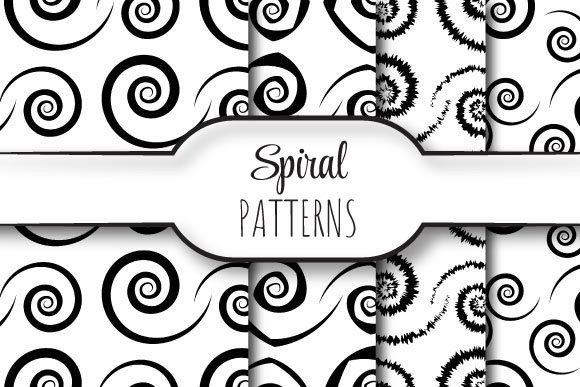
Spirals: Seamless Vector Patterns for Every Creator
Imagine a design element that flows endlessly—no visible start, no abrupt end—just smooth, organic motion that repeats flawlessly across any surface. That’s what Spirals delivers: a curated set of seamlessly repeating vector patterns built for real-world use. Each pattern is crafted as a 12 × 12 inch tile (3600 × 3600 pixels at 300 dpi), fully scalable, editable, and ready for print or digital deployment. The package includes four EPS 10 files—industry-standard, layer-friendly, and compatible with Adobe Illustrator, CorelDRAW, Affinity Designer, and other vector editors—as well as matching high-res JPEGs for quick previews or raster-based workflows.
What Makes These Spirals Different?
Not all spiral patterns are created equal. These aren’t just decorative flourishes—they’re mathematically precise, edge-aligned repeats. That means when you tile them side by side or stack them vertically, the curves, spacing, and rhythm match perfectly. No gaps. No misalignments. No manual nudging required. Because they’re built in EPS 10, they retain full editability: adjust stroke weight, recolor individual paths, isolate segments, or scale infinitely without pixelation.
The zip file contains exactly what you need to get started—no extras, no bloat. Four distinct spiral variations offer different densities, directions, and rhythmic feels: tight concentric coils, open logarithmic sweeps, interwoven double spirals, and minimalist single-line forms. Each serves a different visual purpose—and invites different kinds of creative decisions.
Why Designers and Print Professionals Reach for These Spirals
For graphic designers preparing packaging, stationery, or branding assets, seamless repetition isn’t optional—it’s foundational. A business card background, textile mockup, or book cover texture must hold up at any size and across multiple panels. These Spirals eliminate guesswork: drop one into your layout, define your artboard, and tile it with confidence. At 300 dpi and full vector fidelity, they’re press-ready out of the box—no upscaling, no interpolation, no risk of blur.
Print shops appreciate clean EPS files because they reduce preflight errors. No embedded raster images. No missing fonts. No transparency traps. Just clean paths and consistent color definitions—whether you’re using CMYK for offset printing or RGB for digital displays.
How Educators and Students Use Spirals as Teaching Tools
In design classrooms or self-directed learning, Spirals serve as more than decoration—they’re tactile examples of geometry in action. Instructors use them to demonstrate concepts like radial symmetry, Fibonacci sequences, and tiling logic. Students can deconstruct the EPS layers to see how anchor points align across edges, or experiment with modifying one segment to observe how the repeat propagates.
Because each file is editable and well-structured, learners aren’t just copying patterns—they’re reverse-engineering them. That builds spatial reasoning, vector fluency, and an intuitive grasp of scalability. For educators building lesson plans on pattern design, typography backgrounds, or generative art fundamentals, these Spirals provide reliable, classroom-tested starting points.
Small Business Owners and Marketers: Practicality First
If you run a boutique, launch a product line, or manage social content, time and consistency matter more than technical depth. You don’t need to master Bezier curves—you need something that works *now*, looks polished, and reinforces your brand voice. These Spirals deliver that balance.
Use the JPEG versions to quickly mock up Instagram story overlays, email headers, or Canva templates. Swap colors in seconds using any image editor. Then, when you’re ready for higher-fidelity assets—say, for a Shopify banner or custom wrapping paper—switch to the EPS files and scale without compromise. No subscription. No login. No watermarks. Just four versatile patterns, instantly usable across platforms and projects.
Real-world examples:
- A ceramicist uses the tight concentric spiral as a subtle watermark on product photos—clean, elegant, and non-distracting.
- A wellness coach applies the open logarithmic spiral as a gentle animated background in presentation slides—evoking growth and flow.
- A stationery brand licenses one variation for exclusive use across their entire greeting card line, ensuring cohesion without repetitive design labor.
Hobbyists and DIY Creators: Joy in the Details
Whether you’re hand-lettering in Procreate, laser-cutting acrylic jewelry, or screen-printing tote bags, Spirals add quiet sophistication. Their 12-inch square format fits standard cutting mats and print beds. The EPS files import cleanly into Silhouette Studio and Cricut Design Space (via SVG conversion), letting you resize precisely for earrings, coasters, or wall decals.
What hobbyists often overlook is flexibility—not just in size, but in mood. A dense spiral feels grounded and intricate; a wide, airy one feels light and expansive. Choosing between them isn’t about “which is better,” but about which supports the feeling you want your project to convey. That kind of intentionality makes crafting more satisfying—and results more personal.
What to Consider Before You Use Spirals
These patterns shine brightest when your goals align with their strengths: scalability, seamlessness, and adaptability. If you need ultra-complex fractal spirals with hundreds of nested layers—or photorealistic textures with grain and noise—these aren’t the right tool. Likewise, if your workflow relies entirely on free, open-source software without EPS support, you may prefer starting with SVG alternatives.
But if you value reliability over novelty—if you’ve ever spent hours trying to fix a misaligned tile or resample a blurry background—then Spirals offer tangible relief. They’re not flashy. They don’t promise AI-powered magic. They do one thing exceptionally well: repeat without compromise.
Getting Started Is Simple
Unzip the folder. Open the EPS file in your vector editor. Select all, then recolor using global swatches. Or copy-paste the JPEG into Photoshop or Figma for fast composition. Scale it to fill a poster, shrink it for a favicon-sized motif, or duplicate and rotate it to build new compound patterns.
No tutorials required—but if you’re curious, try this: draw a rectangle the exact size of the tile (12 × 12 inches), place it over the spiral, and use it as a clipping mask. Now move the spiral underneath. Watch how the rhythm stays intact, no matter where you position it. That’s the quiet power of true seamlessness.
Whether you’re sketching your first logo or finalizing a client’s luxury packaging suite, Spirals meet you where you are—supporting clarity, saving time, and leaving room for what matters most: your idea, your voice, your work.